February 18th, 2026

We’re excited to introduce Retry Logic for WhatsApp messages to improve delivery reliability and minimise message failures caused by temporary issues.
With this enhancement, WhatsApp messages that fail due to transient errors (such as network disruptions or temporary unavailability) are automatically retried — ensuring your critical communications have a higher chance of successful delivery.
What’s New?
Configurable retry attempts for failed WhatsApp messages
Automatic retries for transient delivery failures
Logged retry attempts for better visibility and tracking
Improved overall WhatsApp delivery success rate
Why It Matters
Reduces manual effort in handling failed messages
Increases reliability of time-sensitive communications
Minimises missed notifications for end users
Provides better monitoring through detailed delivery logs
This update ensures that temporary delivery failures do not disrupt your customer communication workflows.
For more details, refer to the documentation.
December 18th, 2025

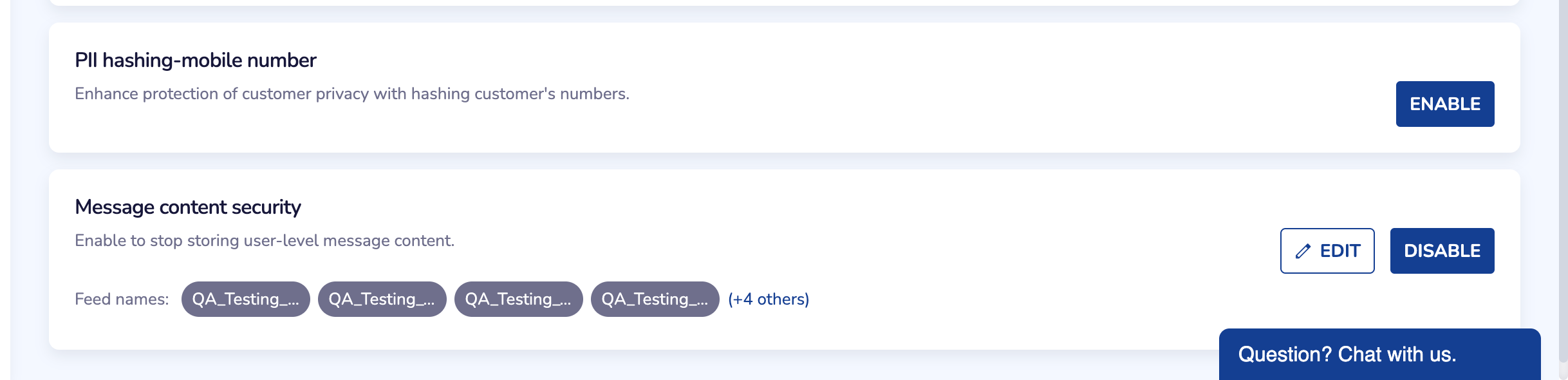
PII Hashing is now live in CPaaS SMS to protect customer mobile numbers. We convert them into irreversible hash values before storage or transmission. Additionally you can enable message content security to stop message content storage.
What’s New
Hashes mobile numbers to safeguard PII.
Prevention of message content storage.
No impact on SMS delivery or campaign performance.
Enable it from Settings in the CPaaS SMS portal. Refer to the documentation to learn more Link
December 8th, 2025
Meta recently expanded Automatic Creative Optimizations (ACO) and Smart Testing for the WhatsApp Marketing Messages API. These features automatically adjust message formatting and extract titles to improve performance.
However, Meta has confirmed ongoing issues with two ACO components:
Some businesses have reported that WhatsApp messages are being delivered with:
Missing or altered spacing
Modified text layout
Unexpected changes in message structure
In certain cases, ACO incorrectly interprets promotional phrases.
Example:
A message containing “20% better results” was altered to appear as “20% off”, leading to misleading communication.
These issues may cause unintended message variations or incorrect promotional claims.
For more details on ACO, refer to Meta’s official documentation:
https://developers.facebook.com/docs/whatsapp/marketing-messages-api-for-whatsapp/sending-messages#configure-automatic-creative-optimizations--whatsapp-business-account-level
Netcore’s Action
To prevent disruption to customer campaigns, Netcore has disabled ACO for all WhatsApp Business Accounts (WABAs) under our platform.
This includes turning off:
Automatic Creative Optimization
Text Optimization
Tap-Target Title Extraction
If you continue seeing unexpected formatting or title changes in your delivered WhatsApp templates:
➡️ Please write to the Netcore Helpdesk immediately.
Our team will review your WABA configuration and escalate to Meta if required.
December 5th, 2025
Meta has announced revised WhatsApp pricing and policy changes that will take effect globally from 1 January 2026. These updates impact charges across message categories and regions, and Netcore will align with the updated pricing on the same date. What’s Changing
Marketing Messages France & Egypt: Lower rates India: Higher rates
Utility & Authentication Messages North America: Lower rates
These adjustments reflect Meta’s updated cost structure for different regions and message categories.
Effective Date: The revised WhatsApp pricing will be enforced starting 1 January 2026. Messages sent on or after this date will be billed as per the new rate cards.
You can review the updated pricing shared by Meta here. For more details on Meta’s policy and commercial changes, please refer to the official documentation.
November 25th, 2025
New

We’ve added a Webview option when configuring URL buttons inside RCS templates.
This allows links to open inside the RCS app instead of switching to the phone’s browser.
In-app forms
Users can fill surveys, lead forms, or feedback forms without leaving the chat.
Mini landing pages
Show campaign details, offers, or product info within the conversation.
App-like flows
Host quick journeys like login, OTP checks, or quizzes directly inside the RCS thread.
Go to Template Management and start creating an RCS template.
When adding a button or suggestion containing a URL, select the Webview mode and choose the view length (Compact / Medium / Tall) you want the end user to see.
If the end user’s device does not support Webview, the link will automatically open in the device’s default browser.